Home > Tutorials

Plant TimeSheet Entry - PowerForce ™
Introduction
The following document outlines the use of time sheet entry screen based around the "Plant Department Daily Timesheets".
|
Getting There:
[N/A ] 
|
Introduction
This particular time sheet has the requirement that data may be entered against a Job or Equipment Number.
Entering Data
The basic design of the screens attempts to make the required data inputs intuitive and where possible pre-populated with drop-downs so that the data is immediately validated, and removes the onus on the operator.
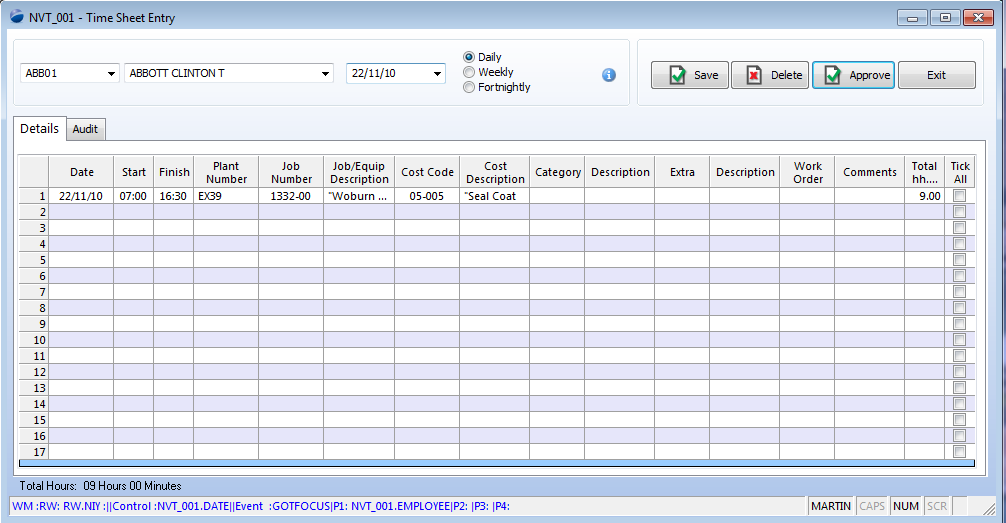
The above screen allows for the data entry centered around an employee, however if you refer to the TimeSheet Entry for a site, you will see that the data is able to be entered via either approach.
Top of Page
Sample Cost Code
To enter data, press the dropdown button and then select the relevant cost-code.

Top of Page
Entering Catergory

Top of Page
Section
XX
Top of Page
Section
XX
Top of Page
See Also
 PowerForce Controls PowerForce Controls
Employee Timesheet Entry (ver 1)
Top of Page

Article updated by PowerForce Software on Friday, Novermber 26, 2010.
Copyright ©2007-2013 Envizion Systems - All Rights Reserved - Terms of Use.
|